Skip to content

One place to order from all your suppliers.

Your agreed prices, one cart and every order tracked.

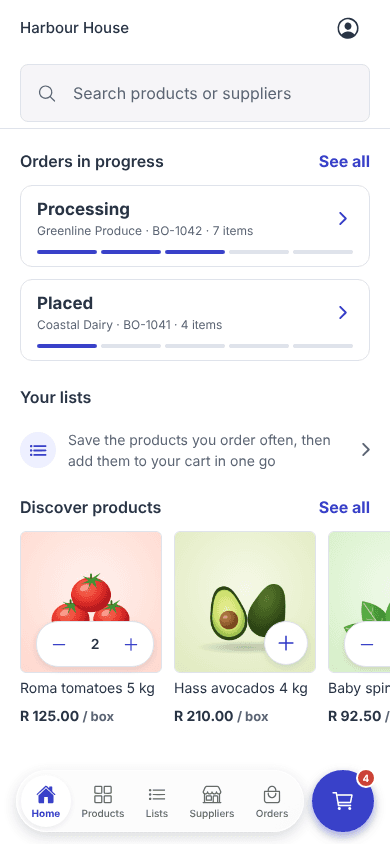
The Enoki app Home screen with orders in progress and products to reorder

Built for both sides of the order

The customer and the supplier see the same order.

Customers get one place to buy. Suppliers get one place to sell. Prices, minimums and statuses match on both sides.

For customers

Order everything for the week in one go.

Your suppliers, your prices and your usual quantities in one place, on the web or on your phone.

  • One cart across all your suppliers
  • Prices you agreed with each supplier
  • Lists and Buy again for the weekly order
  • Every order tracked from placed to completed
For customers

For suppliers

Clean orders from customers you approved.

Decide who can see your prices, give each customer the right catalogue and run every order from one workspace.

  • Approve, pause or decline each customer
  • Customer-specific catalogues and prices
  • Accept, pick and dispatch with clear statuses
  • Orders from the app, the web and WhatsApp
For suppliers

One order, start to finish

Watch an order go from cart to kitchen.

Scroll to follow one order on both phones: the customer who places it and the supplier who delivers it.

Customer

Cart

Greenline Produce

Roma tomatoes 5 kg

R 125.00 / box

3

Baby spinach 1 kg

R 92.50 / kg

2

Supplier totalR 560.00

R 500.00 minimum met

Total incl. taxR 644.00Checkout
Supplier

Orders

Fig Tree HotelR 3,865.50

SO-2088Processing

Bayside BistroR 1,976.00

SO-2087Completed

Salt & EmberR 2,140.00

SO-2086Completed

  1. 01

    Fill the cart

    Harbour House adds tomatoes and spinach from Greenline Produce, at the prices they agreed. The cart shows the minimum spend is met.

  2. 02

    Check out

    One tap places the order. Greenline Produce gets it at once, with a notification on their phone.

  3. 03

    Accept

    Greenline Produce accepts the order and starts preparing it. Harbour House is told straight away.

  4. 04

    Dispatch

    The order goes out on the truck. Both phones show it's on its way.

  5. 05

    Deliver

    The order is completed at the price it was placed at. Next week, Buy again fills the cart in one tap.

The Enoki app

Two sides of the same order, in your pocket.

Customers order and track from their phone. Suppliers approve customers, accept orders and keep products up to date on the go. Switch sides to see both.

What the customer sees

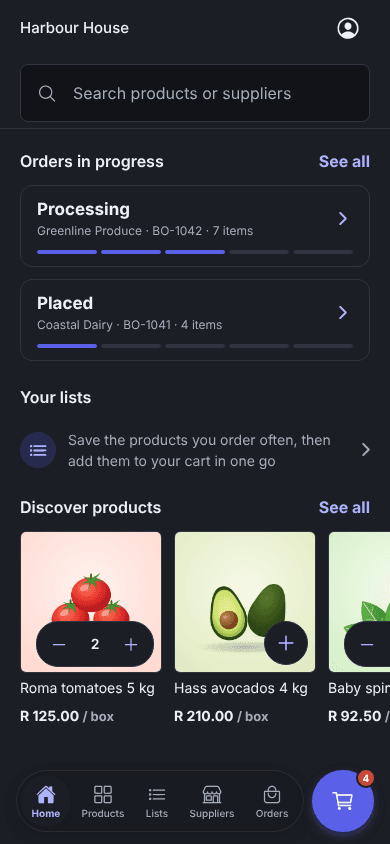
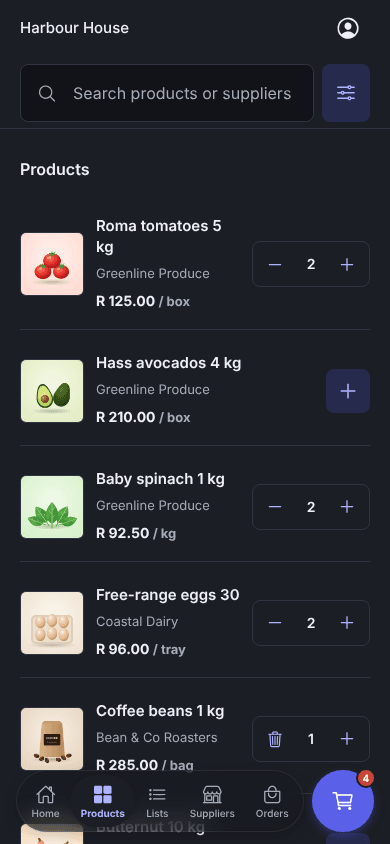
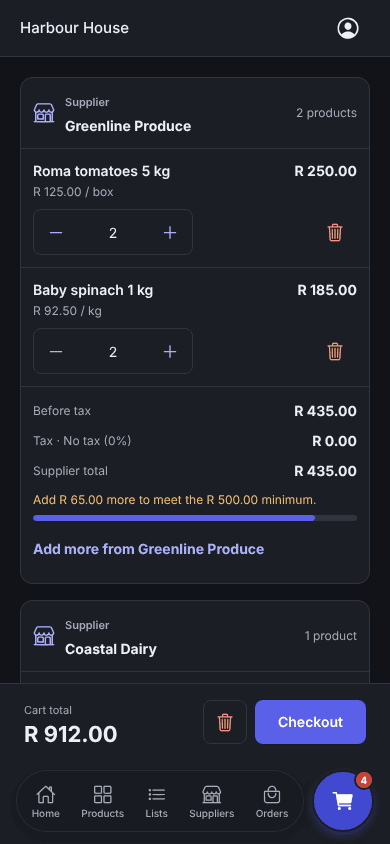
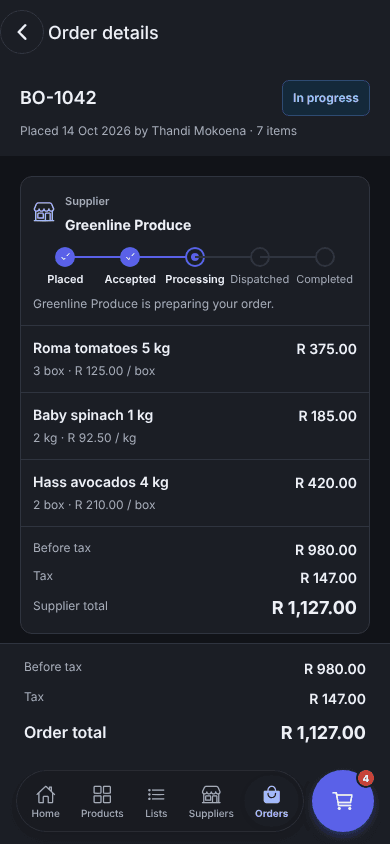
Every supplier's products with photos and agreed prices, one cart and every order's progress.

Enoki app Home for a customer, with orders in progress, lists and product photos
Home: orders in progress and products to reorder
Enoki app product list with photos, supplier names and prices per unit
Products: photos and your prices from each supplier
Enoki app cart grouped by supplier, with a minimum spend bar
Cart: one checkout, grouped by supplier
Enoki app order details with progress from placed to completed
Order: every step and every total

What Enoki does

From the first request to the delivered order.

Every piece below is in the product today, shown with demo businesses.

Prices only for customers you approve

Customers can browse your range, but prices and ordering open only after you approve them.

Greenline Produce

Supplier totalR 435.00

Add R 65.00 more to meet the R 500.00 minimum.

Coastal Dairy

Ready to order

One cart, many suppliers

Each supplier's minimum spend is shown as you shop. If one isn't ready yet, order the rest and keep it in the cart.

BO-1042

In progress
  1. Placed
  2. Accepted
  3. Processing
  4. Dispatched
  5. Completed

Greenline Produce is preparing your order.

Know where every order is

Placed, accepted, processing, dispatched and completed, on both sides of the order.

Weekly orderShared

Roma tomatoes 5 kg× 3
Baby spinach 1 kg× 2
Coffee beans 1 kg× 1
Add all to cart

Lists and Buy again

Save the weekly order as a list, or reorder what you bought last time at the same quantity.

Restaurant trade 2026

Assigned to 14 customers

Roma tomatoes 5 kgR 140.00R 125.00
Baby spinach 1 kgR 99.00R 92.50
Hass avocados 4 kgR 225.00R 210.00

A catalogue for every customer

Give each customer their own range and prices. Build it by hand or from an Excel price list.

Push notifications

New orders and customer requests for suppliers. Order updates for customers. Each one can be turned off.

Enoki app Home in light modeEnoki app Home in dark mode

Light or dark

The app follows your phone, or you choose. Easy on the eyes on a late close.

WhatsApp ordering with AI

Your customers already order on WhatsApp. Now AI turns it into a real order.

No retyping from chats. AI reads what the customer asked for, Enoki matches your products, and replies with the customer's own prices for them to confirm.

  1. 01

    Switch it on under Connections

    The supplier adds their WhatsApp Business number in the dashboard and turns on Take orders by WhatsApp.

  2. 02

    Link the customer's number

    The customer taps Connect WhatsApp next to the supplier. One message links their number to their account.

  3. 03

    Message the order

    "3 boxes tomatoes, 2 baby spinach." AI reads the quantities and products, and Enoki matches them to the supplier's range at the customer's prices.

  4. 04

    Reply YES to place it

    Nothing is ordered until the customer confirms. Then it becomes a normal order in the supplier's workspace, with the same prices, minimum spend and tracking.

AI assistantsPreview

Work with Enoki from ChatGPT or Claude.

Connect your AI assistant to Enoki with your own sign-in. Ask questions in plain language, let it do the typing, or schedule it to run your weekly routine. Anything it changes waits for you to review in Enoki.

Suppliers

  • Ask about orders, customers, products and sources
  • Prepare price list, catalogue and product changes
  • Add product photos from the conversation
  • Create orders and move them along
  • Run automations you schedule in your assistant

Customers

  • Build the cart from a plain list
  • Place the order at your agreed prices
  • Check what you ordered and when
Automations, bespoke workflows and how AI works

How it works

Up and running in five steps.

Customers

  1. 01

    Register your business

    Tell us about your business and where you take deliveries. We check every new business before it can order.

  2. 02

    Connect to your suppliers

    Find the suppliers you already use, or new ones, and ask to connect. You can browse their products straight away.

  3. 03

    Get approved

    Once a supplier approves you, their prices appear. Those are your prices, from your catalogue.

  4. 04

    Order in one cart

    Add products from several suppliers and check out once. Each supplier gets its own order.

  5. 05

    Track it to your door

    Follow each order as it is accepted, prepared, dispatched and completed, with a notification at every step.

Suppliers

  1. 01

    We set up your workspace

    Enoki creates your supplier account and switches on the marketplace for you.

  2. 02

    Load your products

    Upload a CSV or Excel price list, connect Sage, or add products by hand. Add photos in bulk.

  3. 03

    Publish your profile

    Customers can find you once your marketplace profile is live.

  4. 04

    Approve your customers

    Accept connection requests and give each customer a catalogue, an account code and a minimum spend.

  5. 05

    Accept and dispatch

    Accept each order, mark it ready and dispatched, and send it on to your own system as a CSV.

Questions

Good to know.

Who is Enoki for?

Restaurants, cafés, hotels and caterers that order from several suppliers, and the suppliers who sell to them: fresh produce, dairy, meat, coffee, drinks, packaging and more. Suppliers can sell services too.

When can a customer see prices?

After the supplier approves the connection. Until then a customer can browse products, but prices and ordering stay closed. Approved customers see the prices from the catalogue their supplier gave them.

Does Enoki take payment?

No. Enoki places the order with each supplier at your agreed prices. You pay your suppliers the way you do today.

Can my customers keep ordering on WhatsApp?

Yes. Connect your WhatsApp Business number under Connections. A customer sends their order as a message, Enoki replies with the products and prices, and they reply YES to place it.

Where does AI come in?

Two places. On WhatsApp, AI reads what the customer asked for and Enoki builds the priced order for them to confirm. And in preview, you can connect ChatGPT or Claude to Enoki to ask about your orders and products, or prepare changes that you review in Enoki before they apply. You can also schedule automations in your assistant, and our team can build bespoke workflows around how you work.

Do I need the app?

No. Everything for ordering works in the web dashboard. The app adds push notifications, dark mode and ordering from your phone, for customers and suppliers.

How do I get my products in?

Upload a CSV or Excel file, connect Sage, or add products by hand. You can add photos in bulk afterwards.

See Enoki with your own suppliers and products.

We'll walk you through ordering, approvals and fulfilment, and set up your workspace with you.